
Published September 10, 2026
How to Write the Perfect AI Image Prompt: A Step-by-Step Guide
Learn how to turn an idea into a clear, actionable AI image prompt—from subject and composition to lighting and style—then use a practical workflow to evaluate and refine the result step by step.
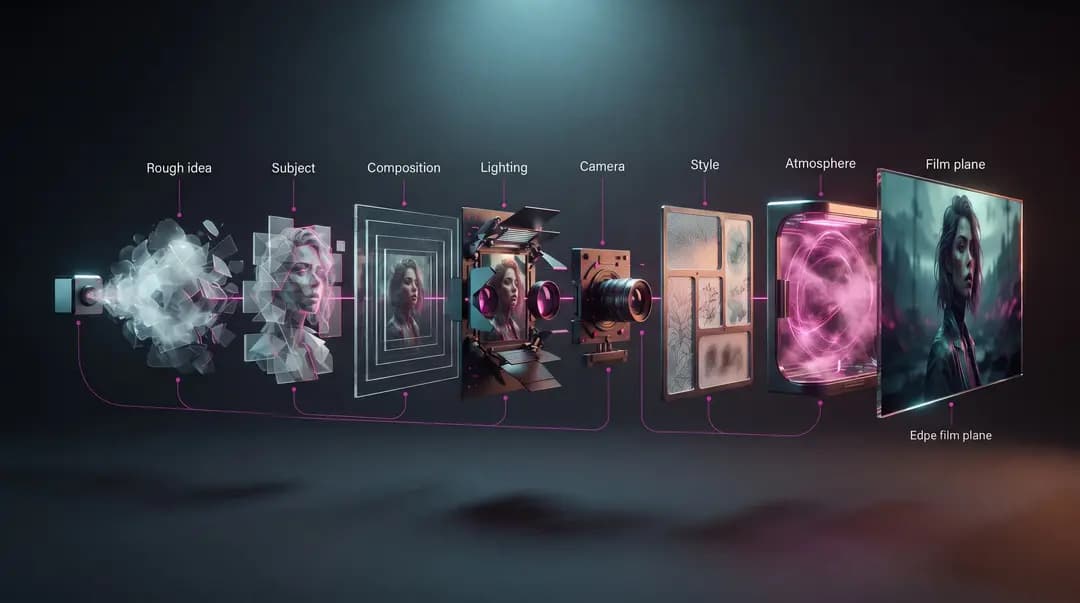
Writing a good AI image prompt does not mean creating a long description packed with keywords. The real goal is to turn your idea into clear visual instructions that help the model understand what should appear in the image, how it should look, and what should be avoided. That is why a short but specific prompt can outperform a long paragraph filled with vague or conflicting descriptions.
More importantly, writing the prompt is only one part of the process. In practical use, better results usually come from an iterative workflow: define the goal, build the description, generate the image, inspect the result, identify the problem, and modify only the part responsible for it. This turns image prompt engineering into a controlled refinement process rather than an attempt to guess the perfect prompt in one shot.
Start Before the Prompt: Define the Result You Want
Before writing any prompt, ask: what is this image for? Is it a portrait, product image, cinematic scene, social media visual, concept art, or an image that will be edited later? This decision determines how much detail you need and which visual decisions should be specified.
I want an image of a man in a city.
A cinematic image of a man in his mid-thirties walking alone through a rainy urban street at night, neon reflections on wet asphalt, medium shot at eye level, softly blurred city background, gentle side lighting, cool colors with warm neon accents, realistic and dramatic mood.
The Core Structure of a Professional Image Prompt
There is no single mandatory formula that works identically across every image generator, but it is useful to think of a prompt as a set of visual decisions. You can order those decisions according to what matters most instead of following a rigid template.
1. MAIN SUBJECT
Define who or what the image is about. Use visible characteristics that can be represented rather than vague descriptions such as "beautiful" or "amazing".
2. ACTION OR STATE
If the subject is a person or object, describe what it is doing or how it is positioned or moving. Action helps define pose and relationships between elements.
3. ENVIRONMENT & CONTEXT
Define the location, time, and surrounding conditions: street, studio, forest, futuristic setting, morning, night, rain, fog, and so on.
4. COMPOSITION & FRAMING
Define the shot type and placement of elements within the frame: close-up, medium shot, full body, wide shot, centered composition, rule of thirds, foreground/background separation.
5. CAMERA ANGLE & PERSPECTIVE
Specify the viewpoint: eye level, low angle, high angle, overhead, side view, or rear view. These choices affect scale, depth, and visual impact.
6. LENS & IMAGE CHARACTER
Specify lens characteristics when useful: wide-angle, 35mm, 50mm, macro, shallow depth of field, or deep focus. Do not add technical specifications simply to make the prompt longer.
7. LIGHTING
Define the light source, direction, quality, and effect: side-window light, soft studio light, backlighting, golden hour, neon lighting, or dramatic lighting.
8. VISUAL STYLE
Define the desired visual language: photorealistic, oil painting, watercolor, 3D, concept art, and so on. When style matters, keep it clear and coherent rather than combining conflicting styles.
9. COLOR & MOOD
Describe the color palette and overall mood when they are important to the goal: cool tones, earthy colors, high contrast, calm, mysterious, warm, or epic.
10. CONSTRAINTS & EXCLUSIONS
Mention unwanted elements when they matter: unwanted text, logos, extra objects, cluttered backgrounds, or specific artifacts. However, negative prompts and how they are interpreted vary between models.
A Practical Workflow: From Idea to Final Image
Instead of trying to write the perfect prompt in one attempt, use a six-stage workflow. This is especially useful when the image is complex or contains multiple interacting elements.
Stage 1 — Define the goal: describe in one sentence what the image should communicate. Stage 2 — Define the core elements: subject, action, environment, composition, lighting, and style. Stage 3 — Write the first version without overloading it with details. Stage 4 — Generate multiple results instead of judging a single output. Stage 5 — Diagnose the problem: is it the subject, pose, composition, lighting, style, or an unwanted element? Stage 6 — Modify only the part responsible for the problem and regenerate.
A Critical Rule: Do Not Change Everything at Once
If the image is good except for the lighting, do not rewrite the subject, composition, and style. Change the lighting only. If the person looks right but the hand position is wrong, focus on the pose or use an appropriate editing tool. Changing five variables at once makes it difficult to understand which change improved or damaged the result.
Practical Example: Building a Prompt Step by Step
A man on a horse in the mountains.
A man wearing dark leather travel clothing riding a brown horse along the edge of a mountain valley at sunset, the horse shown in a clear side profile, the rider looking toward the horizon, distant mountains covered in light atmospheric haze, a cinematic wide shot from a slightly low angle, warm backlight outlining the rider and horse, earthy colors with a warm sky, realistic detail, a sense of adventure and vastness.
Notice that the stronger version does not simply add more adjectives. It adds specific visual decisions: the horse's position, the rider's gaze, shot type, camera angle, light source, foreground/background relationship, and color palette. These decisions make the description more actionable as an image.
How to Write Prompts for Portraits
For portraits, describing the person is only the beginning. Think about shot type, face direction, body pose, facial expression, background, lighting, clothing, and the visual distance from the camera. When using a reference image, clearly define what must remain consistent and what you want to change.
How to Write Cinematic Image Prompts
For cinematic scenes, focus on relationships between elements rather than stacking keywords. Start with the scene and action, then define framing and camera angle, followed by lighting and mood, and finally add details that support the story. You do not need dozens of cinematic terms if they do not add a clear visual decision.
How to Write a Product Image Prompt
For product images, the product should remain the primary controlled element. Define its angle, background, lighting, shadows, display surface, and negative space when the image will be used for advertising or a product page. When product identity matters, avoid adding details that could alter its shape or branding.
Choose the Aspect Ratio Before Generating
Aspect ratio is not merely a technical setting. Choosing 1:1, 4:5, 16:9, or 9:16 changes the available composition space and the placement of elements within the frame. Decide where the image will be used before finalizing the composition.
When Should You Use a Negative Prompt?
A negative prompt is not a magic switch that prevents every mistake. Some models support negative prompts directly, while others rely more heavily on positive descriptions or different editing instructions. Do not assume that adding a long list such as "bad hands, ugly, distorted, blurry" will always improve the result. Use constraints when they are useful and according to the behavior of the model you are using.
When Something Goes Wrong, Do Not Rewrite the Entire Prompt
Use diagnosis instead of guessing. If the subject is correct but the background is cluttered, modify the environment or background. If the image looks good but the composition is wrong, change the shot type or subject placement. If the lighting is wrong, do not change the entire style. And if the problem is limited to a small area, inpainting or localized editing may be more efficient than regenerating the entire image.
A Workflow for Fixing Common Image Problems
For unnatural hands and fingers, first improve the pose description or use appropriate editing tools. For inconsistent faces, review face angle and shot size and consider reference images or localized editing when appropriate. For distorted text, if the text is important, it may be better to add it later using a design tool. For unwanted extra objects, clearly specify the number and relationships of elements rather than relying only on a negative prompt.
Common Image Prompting Mistakes
1. Using vague adjectives instead of actionable visual descriptions. 2. Adding unnecessary details that do not serve the goal. 3. Combining conflicting instructions such as realistic photography with several contradictory art styles. 4. Ignoring composition and describing only the subject. 5. Trying to fix one problem by rewriting the entire prompt. 6. Adding technical terms without understanding why they are useful. 7. Assuming the same prompt will behave identically across all image models.
A Reusable Image Prompt Template
[Subject] + [Action or State] + [Environment and Context] + [Composition and Framing] + [Camera Angle and Perspective] + [Lighting] + [Style] + [Color and Mood] + [Important Constraints].
Do not treat this template as a form that must be filled completely every time. If a particular element is not important to the result, leave it to the model. The value of the template is that it helps you think through important decisions, not that it makes the prompt longer.
When Is a Longer Prompt Better?
Length is not a measure of quality. A longer prompt becomes useful when additional details are necessary to achieve a specific visual goal, such as a multi-element scene, complex composition, or precise requirements for clothing, environment, and lighting. If details are repetitive, contradictory, or irrelevant, they can make the result harder to control.
The Difference Between a Good Prompt and a Good Workflow
You can write an excellent prompt and still get an unsuitable result. That does not necessarily mean the prompt failed. The limitation may come from the model, its interpretation of certain elements, the composition, or the fact that the image needs editing rather than regeneration. The real skill is therefore not only writing a good prompt, but knowing what to change after seeing the output.
Conclusion: Think Like a Visual Director
The best way to write an image prompt is not to memorize a collection of magic words, but to think like a visual director. Decide what should be visible, where it should be placed, what is happening in the scene, how it should be lit, and what feeling the image should communicate. Then generate, analyze what worked and what did not, and modify only the variable responsible for the problem. This turns image generation into a repeatable refinement process rather than random trial and error.
Read also
30 Ready-to-Copy AI Image Prompts for Professional Results
A curated set of ready-made image prompts organized by use case: portraits, product shots, backgrounds, and art styles — copy them and just edit the bracketed parts.
Best AI Image Generation Tools in 2026: The Complete Comparison
From Nano Banana 2 to GPT Image 2 and Midjourney — a practical comparison of the strongest AI image generators in 2026, and who each one fits best.
AI Image Aspect Ratios: The Right Image Size for Every Platform in 2026
Before writing your next prompt, choose the right aspect ratio and dimensions first. This guide explains the image ratios and sizes for major platforms and how to choose the right format when generating images with AI.